


From Run of Show to Recap Reel: What Professional Event Videography Should Include for a Smoother Experience

Most event videos miss key moments that make your story shine. You’ve planned every detail, but without a clear event video checklist, stress sneaks in and the magic gets lost. Let’s break down what professional event videography Boise hosts deserve—so your next event flows smoothly from run of show to recap reel, capturing memories that truly connect your community. Learn more about essential tips in videography and photography.
Essentials for Event Videography
Crafting the Perfect Shot List
Creating a shot list is like drawing up a game plan for your event's story. It ensures you capture those key moments that make your video memorable. Start with the must-have shots: the guests arriving, the main highlights, and candid moments that show genuine emotions. This list keeps you organized and focused.
Think about the event's flow. Will there be speeches or performances? Make sure these are in your list. Also, consider angles and framing. Do you want wide shots to show the venue's grandeur, or close-ups to capture intimate expressions? Having these details planned out can make all the difference. Remember, a detailed shot list is crucial for a smooth filming experience.
Venue and Tech Prep
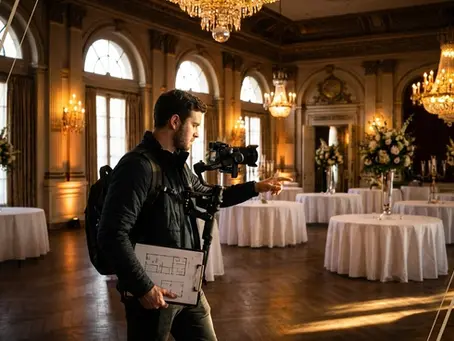
Understanding your venue is vital. Arrive early to scout the area. Check the lighting conditions and note any potential issues. Is there enough natural light, or will you need to bring additional lighting equipment? Pay attention to the acoustics, especially if speeches are a part of the event.
Prepare your gear accordingly. Ensure your cameras, tripods, and microphones are ready to go. Having a backup plan for technical glitches is wise. It’s also important to coordinate with the venue staff. Knowing where power outlets are located and understanding any restrictions can prevent last-minute surprises. Preparation is your best friend in videography.
Multi-Camera and Drone Coverage
Using multiple cameras can elevate your event video by providing diverse perspectives. It captures the full essence of the occasion and keeps the audience engaged. Position cameras strategically to cover different angles and important sections of the event.
Drones add a dynamic touch. They offer aerial views that are both impressive and informative. Ensure you have the necessary permissions and follow safety guidelines. Drones can capture the scale of an outdoor event beautifully, creating shots that leave a lasting impact. Engaging visuals can transform an ordinary video into something extraordinary.
Enhancing Event Impact
Real-Time Media Management
Managing media in real-time can be a game-changer. This means organizing footage as you go, ensuring everything is backed up and easily accessible. It prevents losing important moments in the chaos of an event. Having a team member dedicated to this task can streamline the process.
Additionally, real-time media management helps you quickly address any issues that arise during filming. It allows for on-the-spot edits and adjustments, keeping the final product polished and professional. Remember, an organized approach saves time and enhances quality.
Highlight Reels and Recap Videos
Creating highlight reels and recap videos offers a concise summary of your event. These are perfect for sharing on social media or with attendees who couldn’t make it. Focus on capturing the essence of the event: the energy, key moments, and audience interactions.
Highlight reels should be engaging and fast-paced, drawing viewers in from the start. Recap videos can be a bit more detailed, providing a narrative arc that reflects the event’s overall experience. Both formats are essential for maximizing your event's impact and reach.
Social Media and Brand Flow
Social media is a powerful tool for extending your event’s reach. Sharing snippets, teasers, and behind-the-scenes content keeps your audience engaged before, during, and after the event. It's crucial to tailor content to each platform for optimal engagement.
Consider incorporating a social media video package into your plan. This ensures consistent, high-quality content that aligns with your brand's voice. It's an effective way to maintain momentum and build anticipation for future events.
Seamless Production Experience
Audio-Visual and Lighting Setup
A flawless audio-visual setup is key to a professional event video. Clear sound and proper lighting make a huge difference in the final product. Test all equipment beforehand. Ensure microphones are functioning and lighting is balanced to avoid harsh shadows or washed-out scenes.
Consider the event's atmosphere. Use lighting to enhance the mood or highlight specific areas. Great audio captures the excitement and emotional highs, drawing viewers into the experience. An exceptional setup can transform your video into a captivating story.
Live Streaming Capabilities
Incorporating live streaming can significantly increase your event's audience. It allows people who can’t attend in person to participate virtually. Make sure your internet connection is stable and your streaming equipment is reliable.
Test your streaming setup before the event. Ensure that audio and video quality meet your standards. Consider offering a multi-camera live streaming experience for a more immersive feel. This not only broadens your audience but also enhances engagement and interaction.
Post-Event Delivery and Analytics
After the event, focus on delivering a polished final product. Ensure all edits are completed and the video is ready for distribution. Provide clients with easy access to their videos, either through digital download or physical copies.
Don’t overlook analytics. Use data to understand what worked well and where improvements can be made. This feedback is invaluable for future projects and client satisfaction. A smooth delivery and insightful analytics enhance your reputation as a reliable, professional videographer.
Frequently Asked Questions
What should be included in an event videography checklist?
An event videography checklist should include a shot list, venue details, equipment needs, and backup plans. It should also outline real-time media management, highlight reels, and post-event delivery processes.
Why is multi-camera coverage important in event videography?
Multi-camera coverage captures different angles and perspectives, adding depth and interest to the video. It ensures you don’t miss key moments and provides a comprehensive view of the event.
How can social media enhance an event video’s impact?
Social media extends the reach of your event video, engaging a broader audience. Sharing teasers, highlights, and behind-the-scenes content keeps interest alive and maximizes exposure across platforms.
What role does real-time media management play in event videography?
Real-time media management ensures footage is organized and backed up during the event. It allows for immediate edits and problem-solving, ensuring a smooth and efficient production process.
How does live streaming benefit event videography?
Live streaming allows remote audiences to participate in real-time, increasing engagement and reach. It provides an interactive experience that enhances audience involvement and event impact.

Comments